Access gateway architecture on Azure
This page describes reference architectures for running an access gateway (also called an SSO gateway) on Azure virtual machines. Choose the topology that matches your availability requirements. Larger clusters add redundancy and capacity.
Common building blocks#
All topologies use the same Azure components:
- Public DNS name. Users connect to a fully qualified domain name, such as
gateway.example.com, that resolves to the public IP address of the front end. Create the DNS record (an A record, or a CNAME to the Azure DNS label) in your DNS zone. - Static public IP address. Use a Standard SKU public IP address with static allocation so the DNS record does not change when resources restart.
- TLS certificate. Install a certificate issued by a trusted certification authority whose name matches the public DNS name. If the front end terminates TLS, install the certificate there and keep TLS enabled to the gateway nodes as well.
- Virtual network and subnet. Place the gateway nodes in a dedicated subnet of an Azure virtual network.
- Network security group (NSG). Attach an NSG to the subnet or to the node network interfaces. Allow inbound TCP 443 (and any other gateway ports your design requires) from the internet or the front end, allow the Azure load balancer health probe source (the
AzureLoadBalancerservice tag), and deny everything else. Standard SKU public IP addresses and load balancers are closed to inbound traffic until an NSG allows it. - Health probe. The load balancer probes each node on a TCP or HTTPS port. A node that fails the probe is removed from rotation until it passes again.
- Internal load balancer (optional). An internal load balancer with a private frontend IP address gives internal clients and other Azure services a stable address for the gateway cluster.
- Placement. Spread the nodes across availability zones, or put them in an availability set when zones are not available in the region, so one host or zone failure does not take down the whole cluster.
1-node deployment#
A single gateway node with a static public IP address and an NSG. Suitable for evaluation and small environments where a short outage is acceptable. There is no load balancer and no automatic failover.

2-node cluster deployment#
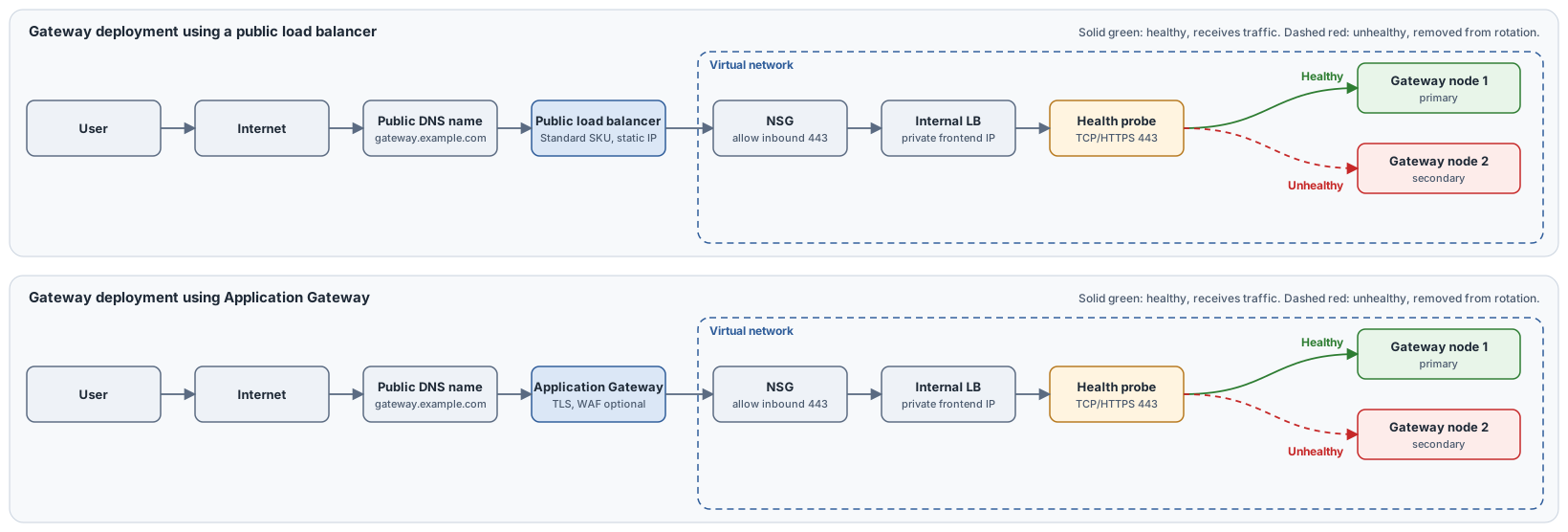
Two gateway nodes behind a load balancer. Choose one of the following front ends:
- Azure public load balancer. A layer 4 load balancer. Use it when the gateway carries traffic that is not plain HTTP or HTTPS, or when you want TLS to terminate on the gateway nodes.
- Azure Application Gateway. A layer 7 load balancer that can terminate TLS, apply a web application firewall policy, and route by host name or path. It requires a dedicated subnet and works with HTTP and HTTPS traffic only.
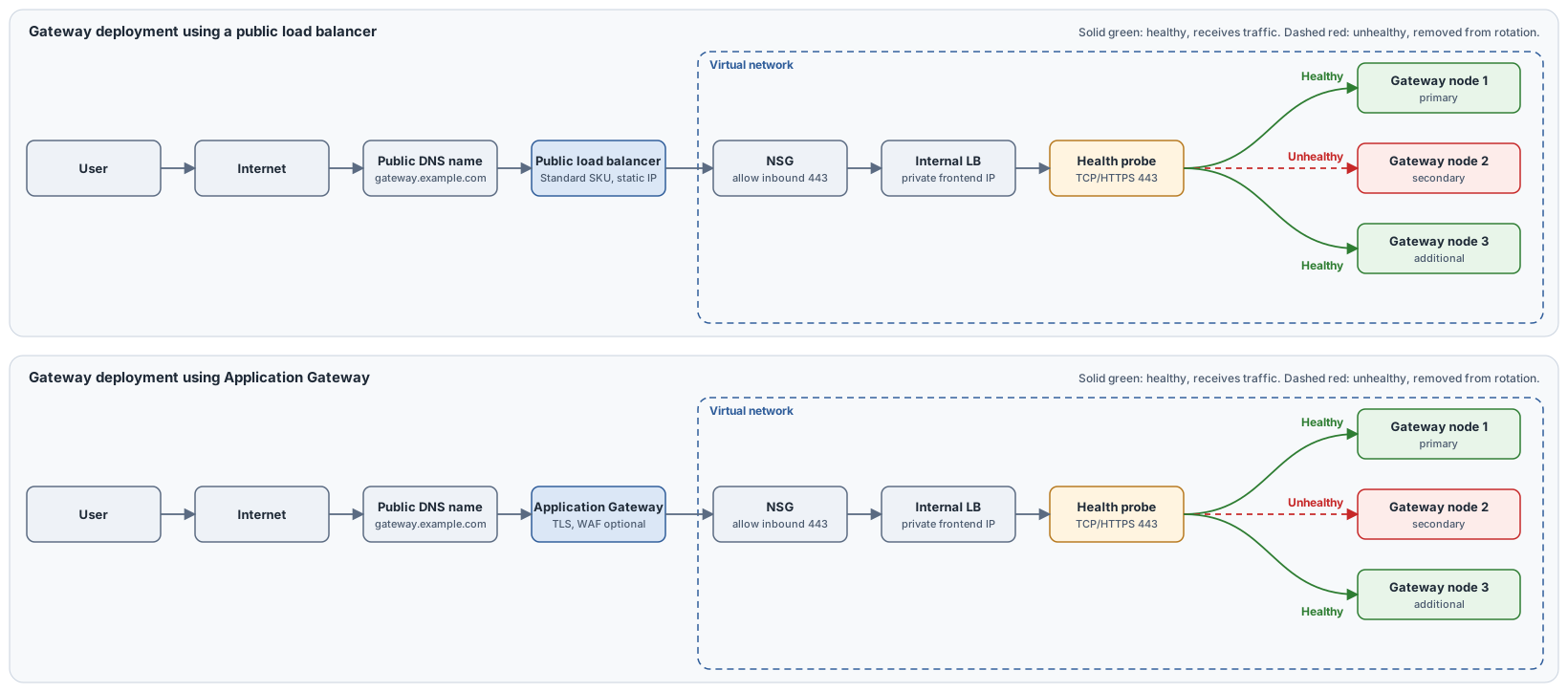
In both designs the health probe monitors each node. When a node becomes unhealthy, the load balancer stops sending new connections to it and uses the remaining healthy node.
3-node cluster deployment#
Three gateway nodes behind a load balancer for higher availability and capacity. The same two front ends apply. With three nodes, the cluster keeps serving users at full redundancy even while one node is being patched or has failed.
Deployment checklist#
- Create the resource group, virtual network, and subnet.
- Create the NSG and the inbound rules described above.
- Deploy the gateway virtual machines across zones or in an availability set.
- Create the static public IP address and the load balancer or Application Gateway, with a backend pool containing all gateway nodes.
- Configure the health probe and the load balancing rule (or listener and routing rule) for port 443.
- Create the public DNS record and install the TLS certificate.
- Test sign-in from outside the network, then stop one node and confirm that users can still connect.