How SAML sign-in works
Single sign-on (SSO) lets users authenticate once, at an identity provider (IdP), and then reach multiple service providers (SPs) such as Microsoft 365, Salesforce, or Google Workspace without entering credentials again. SAML supports two ways to start a sign-in: from the IdP, or from the service provider.
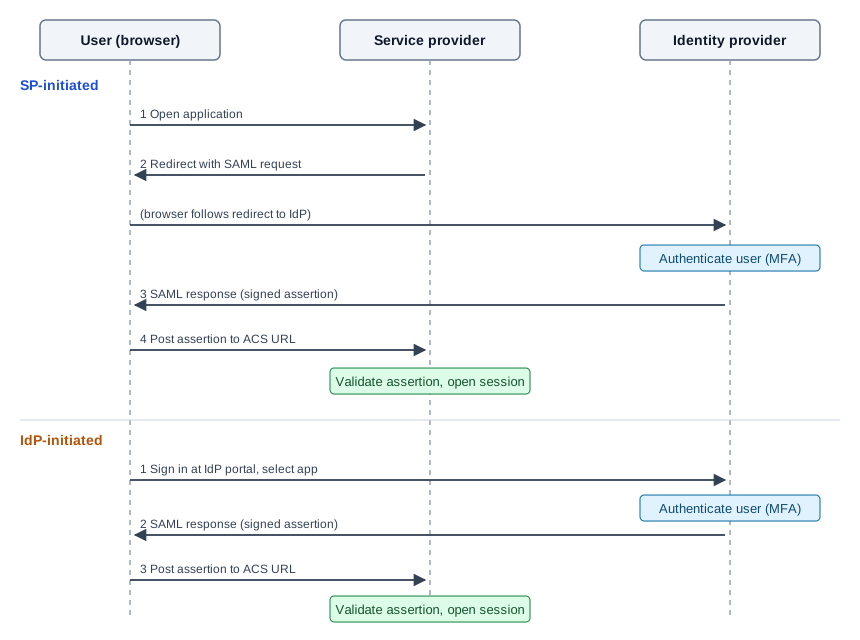
IdP-initiated single sign-on#
In IdP-initiated sign-in, the SAML response starts at the identity provider. No SAML request is sent.
- The user opens the IdP portal and signs in with their credentials, plus multi-factor authentication if required.
- After successful authentication, the IdP shows the applications the user is authorized to use.
- The user selects an application. The IdP creates a signed SAML assertion for that service provider and sends it through the user's browser to the provider's assertion consumer service (ACS) URL.
- The service provider validates the signature, issuer, audience, and time window, matches the user from the NameID or attributes, and opens a session.
Use this flow for a central launch page, bookmarks to the IdP, or applications that cannot start a sign-in themselves.
SP-initiated single sign-on#
In SP-initiated sign-in, the user starts at the service provider, and the provider sends a SAML request to the IdP.
- The user browses to the service provider (for example,
https://office.com) and enters an identifier, such as an email address. - The service provider finds the IdP for that user or domain and redirects the browser to the IdP sign-in URL with a SAML authentication request.
- The IdP authenticates the user (credentials and, if required, multi-factor authentication), unless the user already has an active IdP session.
- The IdP returns a signed SAML assertion through the browser to the ACS URL of the service provider.
- The service provider validates the assertion and opens a session. Some providers then ask whether to stay signed in.
Use this flow when users go directly to the application. Deep links also work, because the provider can return the user to the page they requested after sign-in.
Comparison#
| IdP-initiated | SP-initiated | |
|---|---|---|
| Starting point | IdP portal | Service provider |
| SAML request | None | AuthnRequest sent to the IdP |
| Deep links | Not supported | Supported |
| Typical use | Application launch page | Direct access to the application |
Both flows need the same trust configuration: the IdP and the service provider exchange entity IDs, endpoint URLs, and the IdP signing certificate. For a worked example, see Configure SAML single sign-on for Microsoft 365.